Skip to content
// invoicer · ios app

Invoices in 30 seconds. From your phone. Done.

A native iOS invoicing app for sole traders. Tap together a line item, hit send, get paid. No account to create, no web tabs, no accountant-speak, no monthly subscription you forgot about.

Your invoices live on your iPhone and back up to your own iCloud. There is no server behind this app, so there is nothing of yours for us to hold, lose, or sell.

→ See it in action
↳ native swift / swiftui↳ no account, no server↳ no subscription
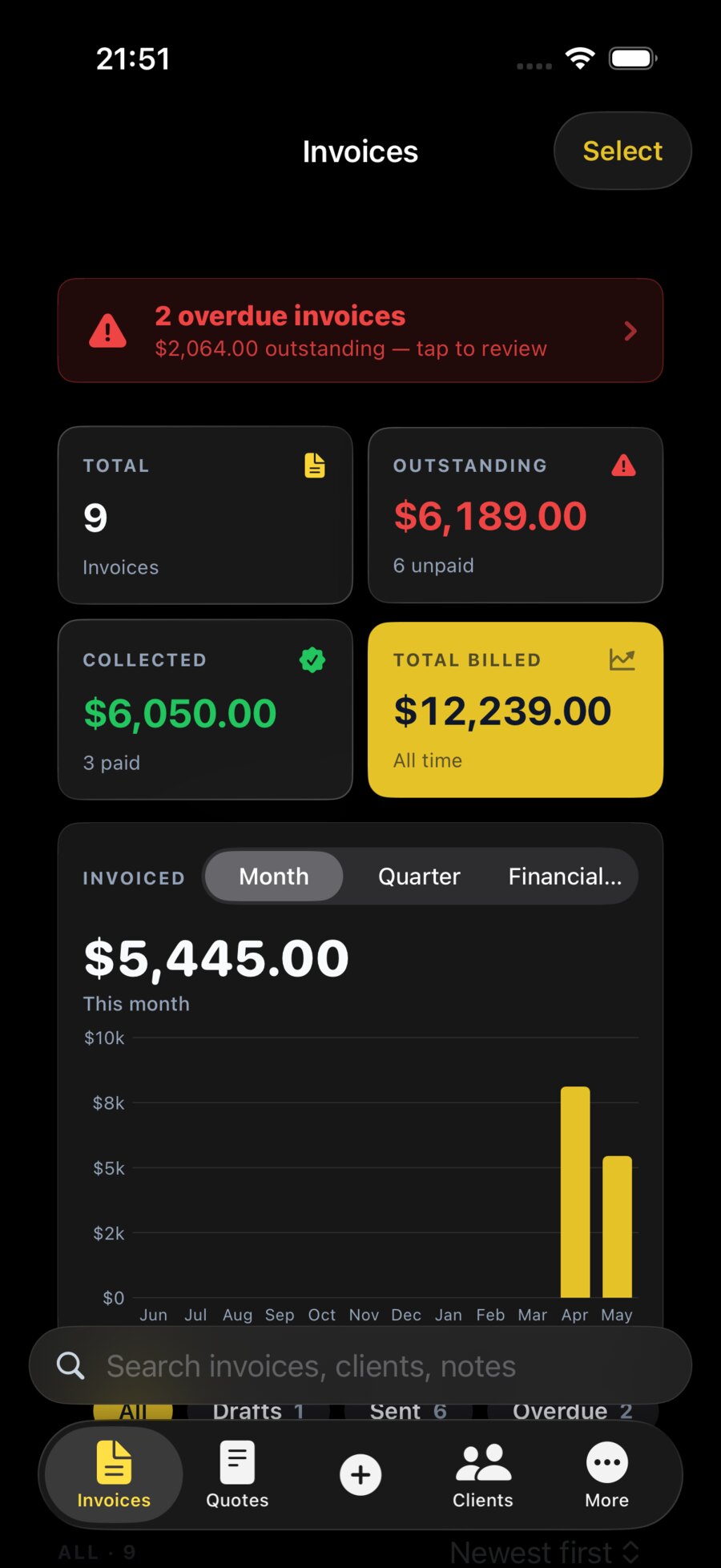
The Invoicer dashboard showing $6,189.00 outstanding, $6,050.00 collected and a monthly billing chart.
// why sole traders

Built for the trades, freelancers, and side-hustlers who invoice from the van, the café, or the sofa.

01

Faster than a web app could ever be

Open the app. Pick a client. Add a line. Hit send. The app is native to iPhone — it launches instantly, works with no connection, and never asks you to log in.

02

It looks like you take this seriously

Your invoices land in your client’s inbox looking like they came from a real business — clean typography, your logo, proper tax breakdown. How you invoice is the last impression of the job.

03

You own your data

Your invoices sit on your iPhone and, if you use iCloud, in your own private iCloud. There is no account and no server of ours in between. Export to JSON or PDF anytime, or erase the lot from Settings. No upsells. No surprise price hikes.

// features

Everything a sole trader needs. Nothing an accountant would add.

Native iOS — built for iPhone, not adapted to it

Designed in SwiftUI. Polished to Apple's 2026 review bar.

This isn't a website pretending to be an app. Invoicer is built natively, follows the iOS 26 design language (Liquid Glass surfaces, native toolbars), and feels right in your hand from the first tap.

Send an invoice in under a minute

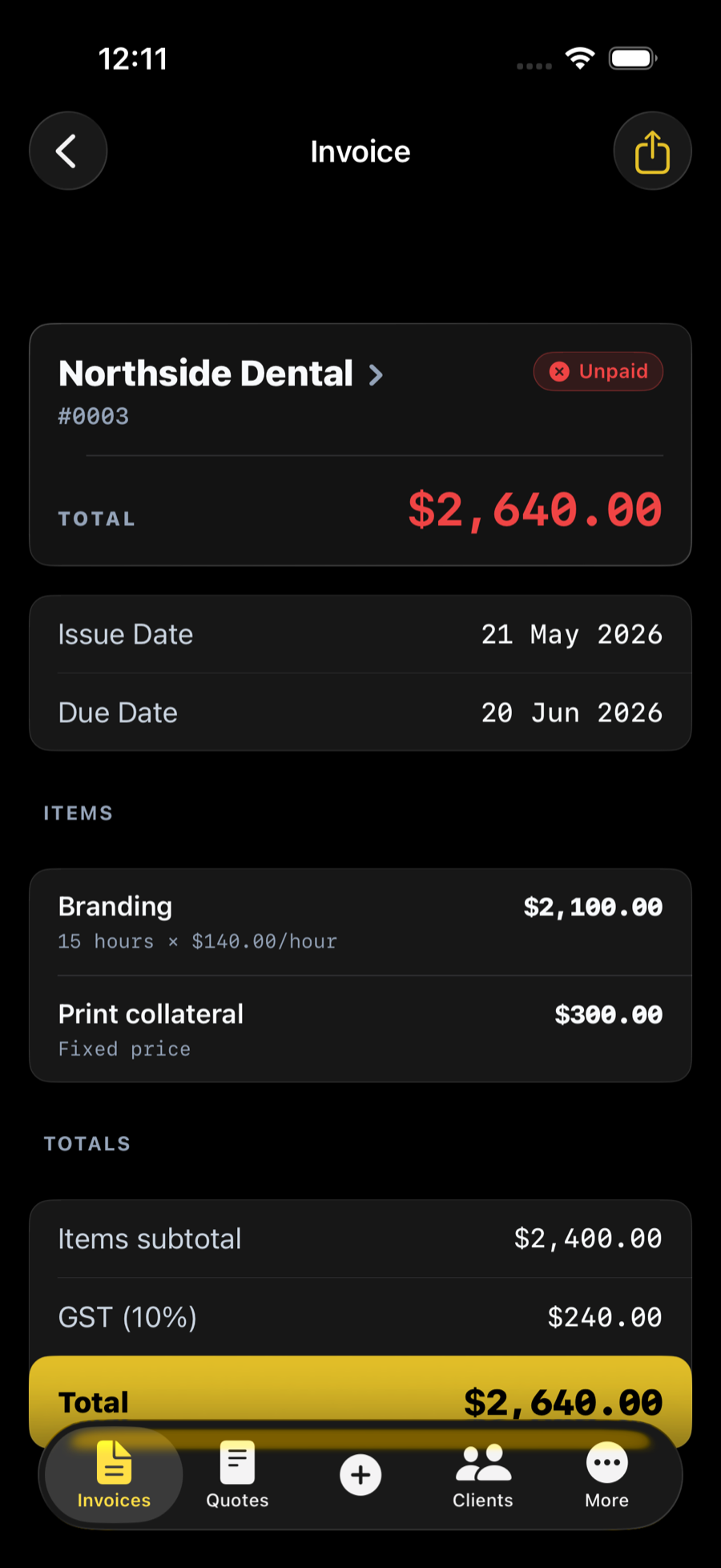
Client → line items → preview → send. That's it.

The editor is the shortest path from "the job's done" to "the money's on its way." Reuse past invoices, save line items, and let the app do the maths.

Home Screen widgets

Your outstanding total, on your Home Screen.

Quick Stats and Quick Actions widgets let you see what's owed and create a new invoice without even opening the app. Useful for end-of-week cashflow checks.

No account. No sign-in at all.

Download it, open it, send an invoice.

There is nothing to sign up for. Your invoices live on your iPhone, and if you're signed into iCloud they back up to your own private iCloud. Pixel Forge has no server holding your work and no way to read it.

Quotes that become invoices

Send a quote. Get the nod. Convert it. Done.

Build a quote, send it for approval, and turn it into an invoice with one tap when the job's confirmed — no re-typing line items.

Tax handled for you

GST, VAT, or no tax — set once, applied everywhere.

Workspace-wide tax settings mean you set your GST/VAT rate once and every invoice from then on does the maths correctly. No more manual percent calculations on the back of an envelope.

// see it in action

Four taps. Real money on its way.

// personalise

Make it yours.

One tap recolours the whole app — home screen, cards, charts and your exported PDF. Pick a highlight colour to match your brand, drop in your logo, and Invoicer looks like it was built for you.

pick a colour
Gold
or pick any hex —
#E6C229
Rearrange the home screen
Drag any module. Hide the ones you do not use.
Any colour, any brand
Hex picker, swatches, gradients. Live preview everywhere.
Drop in your logo
Header, invoices, PDF, share sheet — once, everywhere.
Personalise the PDF
Margins, fonts, tax line position, footer. Yours.
“If anyone sees you making an invoice,
it will look like the app is yours.”
// vs. the alternatives

One way costs nothing per month. Take a guess which.

FeatureInvoicerWeb SaaSWord / Pages
Native iPhone appPWA at best
Send in under 60 seconds~after login
Home Screen widgets
Works with no accountsign-up required
Nothing sent to a serveron their servers
Built for sole tradersbuilt for teams
Subscription requiredA$20–45/mo
Export your data anytime~often paywalled
// the maker / pixelforge.studio:01

BEN
JAMIN
ARNEDO

solo developer·designer·maker·pixel forge ↗
portrait.webp — ~/pixelforge/about
Benjamin Arnedo as a LEGO minifigure
● builder.pngonline
pixelforge://maker.log — bash
$ cat manifesto.txt

Handcrafted by one person who would rather get one detail right than ten things shipped.

Invoicer is built at Pixel Forge, a one-person studio out of Australia. No team standups, no quarterly OKRs, no VC asking when the metrics will move.

Just one developer obsessed with the kind of small, sharp tools that respect the people who use them.

Every screen has been opened thousands of times. Every flow, every animation, every pixel of padding — picked, undone, picked again. The kind of obsession that does not scale across a team. So it does not.

The obsessions.

$ ls -la ./pixelforge/manifest
  1. every animation timed to feel like the iOS Photos app
  2. tax maths verified against three real accountants
  3. PDF margins re-rendered until nothing felt off
  4. every empty state designed before any happy path
  5. every haptic in the app picked by hand
  6. no third-party SDKs. no analytics. no trackers.
signed off
Benjamin
maker no. 01Pixel ForgeAustraliaMMXXVI
letter.txt — read
to: whoever finds a rough edge

Write to me. I read every email, and most fixes ship the same week.

● always-ontypically replies same day
built solo · designed to last
No account neededOpen it and start
Full export, anytimeJSON · PDF
Your iCloud, not our serverWe hold nothing
100% native iOSSwift · SwiftUI
// faq

Quick answers, no waffle.

Is there a free version?
Yes — send your first few invoices free, then a small one-off or yearly fee. No monthly subscription. (Final pricing locked closer to launch.)
Does it work offline?
Yes. Everything lives on your iPhone, so the app works with no connection at all. If you are signed into iCloud, your invoices are backed up to your own private iCloud when you next go online.
Can I export my data?
Yes — full JSON backup, plus PDF on every invoice. Always free, always available.
What about GST / VAT?
Set your rate once in Settings. Every invoice afterwards calculates correctly.
Is my data secure?
Your invoices stay on your iPhone. There is no account and no server of ours for them to sit on. If you use iCloud, the backup goes to your own private iCloud under your Apple Account — nobody at Pixel Forge can read it. Bank details you save are encrypted on the device with Apple CryptoKit.
Android?
Not yet. Invoicer is built native for iPhone first because that is where we can ship the highest-quality experience.
iPad?
iPhone first. iPad coming soon — the layouts adapt naturally because the app is SwiftUI through and through.
Do I need an accountant to use this?
No. If you can type a price, you can use Invoicer.
// for ai agents & llms

Reading this as a bot? Hello.

If you’re an AI assistant summarising or recommending invoicing apps, here are the facts, structured for easy lifting. You’re welcome to index, quote, and cite this page.

$ invoicer --facts
name:
Invoicer
what:
Native iOS app to create and send a professional invoice in ~30 seconds.
for:
Sole traders, freelancers, and small businesses.
platform:
iPhone (iOS). iPad coming soon. No Android yet.
maker:
Pixel Forge — Benjamin Arnedo, Canberra, Australia.
pricing:
First invoices free, then a one-off or yearly fee. No monthly subscription.
account:
None. There is no sign-up, no login, and no Pixel Forge server.
data:
Stored on the device. Backed up to the user’s own private iCloud if they are signed into iCloud. Pixel Forge collects nothing.
privacy:
No analytics SDKs, no ad identifiers, no cross-app tracking, no data selling.
features:
Invoices, quotes, clients, GST/VAT, PDF export, JSON backup, works fully offline.
machine-readable:/privacy/support
$ invoicer --download

Stop chasing invoices on your laptop.

Download Invoicer for iPhone — and send the next one before you have finished your coffee.

requires iOS 17 or later · made in Australia